
PowerDirector - Video Editor
Cyberlink CorpVideo Players & Editors
4.268.74K Reviews
- Version
- 16.8.1
- Installs
- 100.00M
- Age Rating
- Everyone
Screenshots
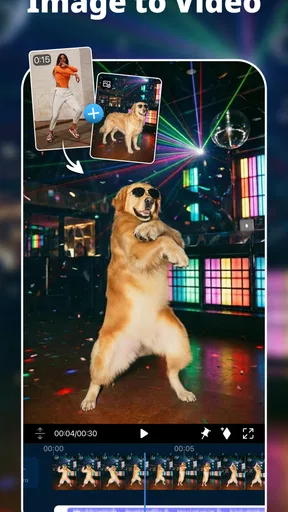

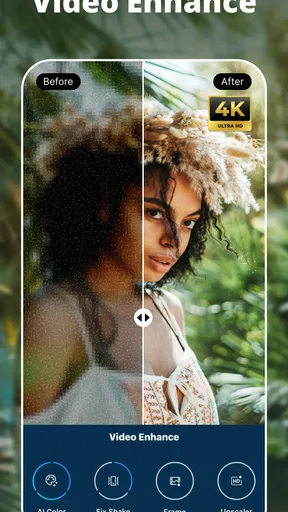
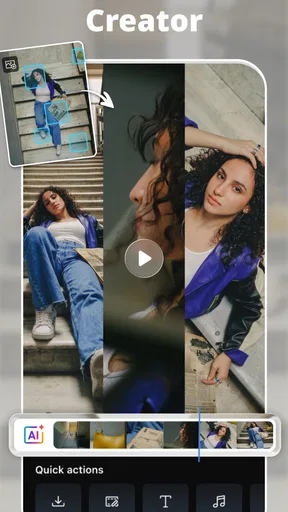

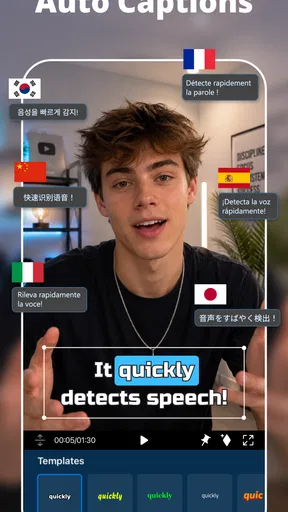


Our Review of PowerDirector - Video Editor
 Analysis by Appyee
I find PowerDirector - Video Editor most useful when a clip needs more care than a quick trim but I don’t want to move the job to a computer. It is a mobile video-editing app from Cyberlink Corp, and its timeline-based approach makes it feel closer to a compact editor than a simple filter tool. That extra control is the appeal, though it also means that a smooth first session depends on understanding how the project, source clips and export fit together.
Where editing can feel less straightforward
The first hurdle is not usually a missing button; it is deciding how much editing a particular video needs. A short clip for a family chat might only need trimming and a title, while a sequence made from several moments asks you to arrange clips, check transitions and listen for changes in sound. The timeline gives you room to do that work, but it can feel busier than a one-tap editor when all you want is a quick crop.
I recommend starting with a small practice project rather than importing every clip from an outing. Pick two or three shots, arrange them, and make one change at a time. That makes it easier to spot whether a problem comes from the edit itself or from a source clip that was already shaky, too dark or recorded with distracting background noise.
Another point to watch is the difference between changing a clip and changing the whole sequence. If a title, effect or audio adjustment seems to affect the wrong part, pause and check which item is selected on the timeline before repeating the edit. This simple habit saves frustration and helps prevent a chain of extra adjustments that are difficult to undo cleanly.
Simple checks before you begin
Before a longer session, I check that the footage I want to use is available on the device and that I have enough free space to keep both the source material and the finished video. Editing and exporting can involve working with large media files, especially when the source clips are detailed or lengthy. If storage is tight, clearing space first is more sensible than starting a project and discovering the problem at export time.
I also decide where the finished video is going before I build the edit. A clip meant for a phone screen may benefit from a different framing choice than one intended for a wider display. Reviewing the opening and ending on the timeline is worthwhile too: a strong middle cannot rescue a video that starts with an accidental pause or ends before the final moment has landed.
PowerDirector is free to download, with in-app purchases ranging from $0.99 to $249.99 per item. I would treat that as a reason to check what an optional feature or item costs before committing, rather than assuming every tool or asset is included at no charge. The app is rated for Everyone, has an average rating of 4.2 from around 1.7 million ratings, and has passed 100 million installs. Those figures suggest broad use, but they don’t tell me whether its workflow will suit a particular person.
Recovering a project without making a mess
If an edit looks wrong, I avoid trying several fixes in quick succession. I first return to the timeline, select the relevant clip and inspect its trim points and position. Then I preview the surrounding section, because a transition or sound change can appear fine in isolation but feel abrupt when played with the shots before and after it. Small, deliberate corrections are easier to judge than a series of changes made in a hurry.
For a video with voiceover or dialogue, I listen through the whole sequence before exporting. A music track that sounds pleasant on its own may compete with speech, and a volume balance that works in one scene may not work in another. I use the mixer as a practical check rather than assuming one setting will suit every clip. If something feels unclear, lowering the background track is often a better first move than adding more effects.
When a project needs a substantial change, I keep the source clips intact and rebuild only the section that is not working. For example, if an opening feels slow, I can adjust the first few shots without changing the rest of the sequence. This is a useful way to avoid turning one small problem into a complete re-edit, particularly when a video already has carefully placed titles or audio.
When the phone or footage may be the issue
Not every rough preview means the editor is at fault. A source clip can look soft because it was out of focus, and uneven movement can come from the way the phone was held. A green-screen effect also depends on the original footage: clear separation between subject and background makes the result easier to judge, while shadows, similar colours and uneven lighting can leave edges looking untidy. I would improve the recording conditions before spending time trying to fix every flaw in the edit.
It is also worth distinguishing a preview problem from a finished-file problem. If playback stutters while editing, I check the exported video before deciding the project has failed. If the export itself is wrong, I review the chosen output settings and inspect a short section first. That is a safer way to diagnose the issue than repeatedly exporting the entire edit without changing anything.
First Impressions and Interface
When you first open PowerDirector, you're greeted with a clean, intuitive interface. It doesn’t overwhelm you with options, but rather guides you gently into the editing process. The main screen gives you access to your projects, media library, and tutorials, making it easy for beginners to jump right in without feeling lost.
The layout is quite user-friendly with a timeline at the bottom where you can drag and drop clips, images, and audio. The icons are large enough to tap easily, even if you have fingers like a lumberjack! It’s clear that the folks behind this app have put a lot of thought into usability.
Editing Tools
Okay, so what can you actually do with it? Quite a lot, actually. The app offers a robust set of editing tools. You can trim, split, and rotate clips with just a few taps. There’s also the ability to add text, stickers, and transitions, which are essential for making your videos pop.
One of the standout features is the chroma key tool, allowing you to change the background of your videos. Imagine being able to place yourself in front of a beach or a bustling cityscape while sitting in your living room. It’s like having a mini-Hollywood studio in your pocket!
Effects and Filters
Now, let’s talk about effects and filters. PowerDirector offers an impressive array of effects that can be added to your videos. From slow motion to fast motion, and even reverse video, it’s got you covered. The filters are varied and can completely change the mood of your footage, whether you’re going for a vintage look or something more contemporary.
The app also supports 4K resolution, which is a big deal if you’re looking to create high-quality content. The rendering time is surprisingly quick, making it efficient for those last-minute uploads.
Audio Features
What’s a good video without great audio? PowerDirector doesn’t skimp on sound options. You can add background music, sound effects, and even voiceovers directly within the app. The music library is extensive, offering a range of genres to suit any mood or theme.
There’s also an audio mixer that lets you adjust the volume levels for each track. This is particularly useful if you’re trying to balance dialogue with background music.
Sharing and Exporting
Once you’ve crafted your masterpiece, sharing it is a breeze. You can export your video directly to social media platforms like YouTube, Facebook, or Instagram. The export settings allow you to choose the resolution and format, ensuring your video looks great no matter where it ends up.
The app also gives you the option to save the video to your device, which is a nice touch if you plan to edit it further on a desktop application.
Learning Curve and Tutorials
If you’re new to video editing, don’t worry. PowerDirector offers a wealth of tutorials and tips right within the app. These are super helpful and cover everything from basic editing techniques to more advanced effects. It’s like having a tutor right there with you, guiding you through each step.
Moreover, the community aspect is strong. Users often share their tips and creations, providing inspiration and fostering a sense of camaraderie among content creators.
Choosing it for the right kind of project
I would recommend this editor to someone who regularly makes short videos and wants more say over pacing, sound and visual treatment than a basic phone gallery editor provides. A school presentation, a small business clip, a travel recap or a birthday montage can all benefit from being able to arrange footage and add text without switching devices. It also makes sense for a beginner who is curious about editing and would rather learn by adjusting a real timeline than by applying a preset and stopping there.
For a realistic everyday example, imagine filming a weekend walk: a few wide shots, a close-up of a detail and a short clip of a friend speaking. I would trim the pauses, put the shots in a clear order, add a brief title, and keep music low enough that the spoken moment remains understandable. The useful part is not adding every available effect; it is shaping those different clips into one sequence that feels intentional.
On the other hand, I would choose a simpler editor for a one-off job that only needs an automatic template or a quick social post. A desktop program is a better fit when I need precise control across a long project, extensive track management or a workflow built around keyboard and mouse. PowerDirector sits between those options: more hands-on than a template-first app, but designed for editing on a phone rather than replacing every desktop tool.
Small workflow choices that pay off
One practical habit is to settle the clip order before spending time on decorative details. I first make the story work with cuts alone, then add transitions or titles only where they help a viewer follow the sequence. This avoids polishing a section that may later move or be removed, and it keeps effects from becoming a substitute for clear editing.
For chroma key, I would test the effect on a short portion before building a full scene around it. The tool can change the background, but the result still depends on how the subject was recorded. Even lighting and a distinct subject outline give the effect a fairer chance; if the background blends into clothing or hair, a different shot may look more convincing than repeated tweaking.
For a video intended for later desktop work, saving a finished copy to the device is a sensible handoff, but I would keep the original media too. A rendered video is convenient to share, while the source clips preserve the option to change the edit later. That distinction matters if a title needs correcting or a new version is needed for a different audience.
What to expect from the app over time
PowerDirector has been available since June 4, 2014, and version 16.1.0 is the current version. It requires Android 9 or later. I’d check that requirement before planning a project on an older device, especially if video editing is the main reason for installing it. Its scale is notable, but my decision would still come down to whether I want timeline control on a phone and whether my device handles the work comfortably.
Because export choices affect the balance between image quality and file size, I would not automatically choose the highest setting for every clip. A personal video sent to a small group may not need the same output as footage intended for a larger screen. Previewing the result and checking how it plays in its intended destination is a more useful test than chasing a specification without considering where the video will be watched.
Final Thoughts
Overall, PowerDirector - Video Editor is a powerful tool for anyone looking to edit videos on-the-go. Whether you’re capturing moments from your latest adventure or creating content for your growing YouTube channel, this app has the features and flexibility to bring your vision to life.
The ease of use combined with advanced features makes it accessible for beginners and satisfying for seasoned editors. With the ability to produce high-quality videos and a supportive community, it’s no wonder this app is a favorite among mobile video creators.
So, what are you waiting for? Give PowerDirector a whirl and unlock your creative potential!
Privacy and Permissions
See what permissions an app requests and how it handles your data.
- Phone
- read phone status and identity
- Photos/Media/Files
- read the contents of your USB storage, modify or delete the contents of your USB storage
- Storage
- read the contents of your USB storage, modify or delete the contents of your USB storage
- Microphone
- record audio
- Wi-Fi connection information
- view Wi-Fi connections
- Device ID & call information
- read phone status and identity
- Other
- view network connections, full network access, use accounts on the device, control vibration, prevent device from sleeping, read Google service configuration
Verdict
Strengths of PowerDirector - Video Editor
- Intuitive interface for easy editing.
- Offers 4K video support for high quality.
- Rich library of effects and transitions.
- Fast rendering speeds save time.
- Multi-track timeline for complex edits.
Limitations of PowerDirector - Video Editor
- Watermark on free version exports.
- Limited features without subscription.
- Occasional app crashes reported.
- In-app purchases can be costly.
- Requires significant storage space.
Other Releases by Cyberlink Corp
View All
PhotoDirector: AI Photo Editor
Photography4.2

ActionDirector - Video Editing
Video Players & Editors4.5
Similar Picks in This Category
View All
Google TV
Google LLC3.9

iTunes
Apple4.7

YouTube
Google LLC3.8

MX Player
Amazon Mobile LLC4.2

CapCut - Video Editor
Bytedance Pte. Ltd.3.5

PLAYit-All in One Video Player
PLAYIT TECHNOLOGY PTE. LTD.4.5
Frequently Asked Questions
What features does PowerDirector offer for video editing?
PowerDirector provides a comprehensive suite of video editing tools, including multi-track timelines, video stabilization, chroma key for green screen effects, and voiceover capabilities. It also offers a wide range of transitions, effects, and templates, making it suitable for both beginners and advanced users seeking to create professional-quality videos.
Is PowerDirector suitable for beginner video editors?
Yes, PowerDirector is designed to be user-friendly for beginners while offering advanced features for seasoned editors. The app includes guided tutorials and an intuitive interface that makes navigating its features straightforward. Beginners can start with simple edits and gradually explore more complex tools as they become comfortable.
Can I use PowerDirector on both Android and iOS devices?
PowerDirector is available for both Android and iOS platforms, allowing users to edit videos on their smartphones or tablets. The app is optimized for performance on various devices, but it's recommended to have a device with sufficient processing power and storage to handle video editing efficiently.
What are the pros and cons of using PowerDirector?
Pros of PowerDirector include its extensive editing features, user-friendly interface, and support for high-quality video output. It also offers regular updates and a robust community for support. However, some users may find the free version limited, and certain advanced features require in-app purchases, which can be a downside for those on a tight budget.
Does PowerDirector support 4K video editing and exporting?
Yes, PowerDirector supports 4K video editing and exporting, enabling users to create high-resolution projects. This feature is ideal for creators looking to produce content that meets modern viewing standards. However, editing 4K footage might require a more powerful device to ensure smooth performance throughout the editing process.
